淘宝官方店 推荐课程 在线工具 联系方式 关于我们 淘宝官方店 推荐课程 在线工具 联系方式 关于我们 |
|
|
微波射频仿真设计 |
|
| 淘宝官方店 推荐课程 在线工具 联系方式 关于我们 |
|
|
微波射频仿真设计 |
|
| 首页 >> Ansoft Designer >> Ansoft Designer在线帮助文档 |
|
Design Verification > Not
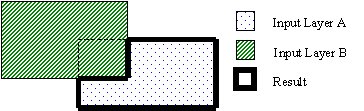
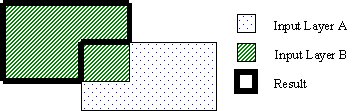
Input: Two DV layers (containing polygons) Output: DV layer (containing polygons) Description: Creates and returns a DV layer that contains geometry generated from the first layer geometry areas that are not common to the second layer geometry. This is not a symmetric operation. The order of the input layers does change the results.
• Not(A, B): Area covered by geometry on layer A that is not also covered by geometry on layer B.
• Not(B, A): Area covered by geometry on layer B that is not also covered by geometry on layer A.
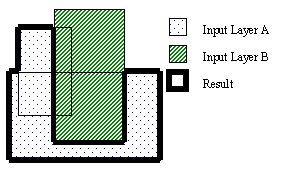
• Geometry on input layers that are imported is merged prior to performing the Not operation. In the following example the two rectangles on layer A are merged into one polygon before doing the Not(A, B) operation. The result of the Not is one polygon.
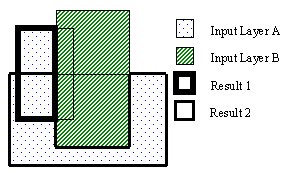
• If the input layers are not imported (they are created within DV), the geometry is used “as is”. In the following example the two rectangles on layer A are not merged before doing the Not(A, B) operation. The results of the Not are a rectangle and a polygon that overlap.
Rule Set Example (JScript): var layer1 = DVChecker.ImportLayer("trace"); var layer2 = DVChecker.ImportLayer("ground"); var notLayer = DVChecker.Not(layer1, layer2);
HFSS视频教程 ADS视频教程 CST视频教程 Ansoft Designer 中文教程 |
|
Copyright © 2006 - 2013 微波EDA网, All Rights Reserved 业务联系:mweda@163.com |
|

 Ansoft Designer / Ansys Designer 在线帮助文档: