




- 1
- 2
- 3
- 4
User Defined Outputs: Introduction
User defined outputs (UDOs) allow users to define calculations through IronPython scripts or any .NET language (and used by the IronPython script). The UDO scripts need to be in the UserDefinedOutputs directory under either syslib, userlib or Personallib with any directory structure needed for organization (the Lib directory name is special and its purpose will be explained later on in the document)
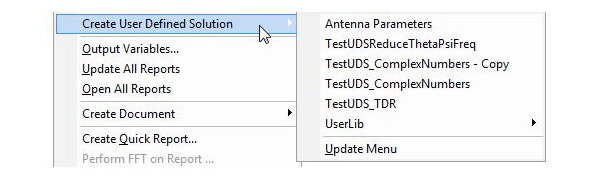
The UDO scripts that are placed in syslib/UserDefinedOutputs, userlib/UserDefinedOutputs or Personallib/UserDefinedOutputs become available to the user to create "User Defined Solutions" through the Results>Create User Defined Solution menu.
Use Results>Create User Defined Solution>Update Menu to refresh the menu to include the new UDO scripts that might have been copied to syslib, userlib or Personallib, or exclude them if they have been deleted, after the launch of desktop. Once the user-defined-solution is created, the solution and the calculations defined by UDO become available in Reporter as any other quantities in a new "User Defined" report type. .
![[spacer]](1p.gif)
Named Probes and Properties in User Defined Outputs
Computation of Traces Based UDO Calculations
Dimensions Reduction by UDO Calculations
Dynamic Probes
Related Topics
User Defined Outputs: Python Script API
User Defined Outputs: Script Organization
Desktop Scripting with IronPython
-

国内最全面的HFSS培训课程,包含7套视频教程和2本教材,资深专家讲解,视频操作演示,结合最新工程案例,让HFSS学习不再难...【详细介绍】
