





- 1
- 2
- 3
- 4
Example Projects
Ring Hybrid
Description - a ring hybrid that can be used as a splitter. Power input to the Sum port splits equally between Ports 2 and 3 in phase while power input to Difference Port splits with 180o phase shift. It can be used as a power combiner with power input to Ports 2 and 3. In that case, the sum of the two inputs will be seen at Sum port and the difference at Difference port.
![[spacer]](1p.gif)
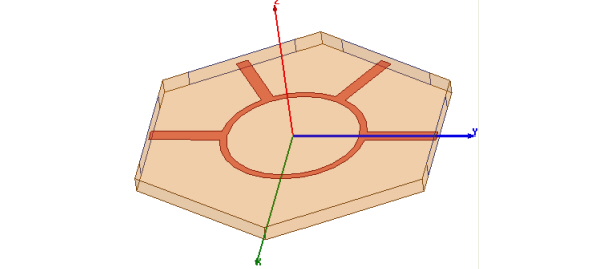
Model - This is a hybrid designed to operate at 10 GHz using stripline transmission lines. The substrate is 40 mil Duriod 5880. The ports are defined on four of the faces of the substrate. Default outer boundary boundary (PerfE) is defined on the remaining faces. The trace is a 2D object with a PerfE boundary.
Setup - Adapt at 10 GHz with interpolating frequency sweep from 8 to 12 GHz. Also, the model includes an output variable called Diff_port_phase that computes the difference in phase between ports 2 and 3 when the Difference port is excited.
Note |
To view a port or boundary, select the desired item in the Project Tree. It is then highlighted in the Model window and the properties will be displayed. Selecting an object in the History tree also displays its properties. |
Ring Hybrid - Post Processing
After solving, you can view solution data by right-clicking on Setup1 and selecting Profile to display the Solution dialog. You also view the Solution tabs for Convergence, Matrix Data, and Mesh Statistics.
To view plots of S parameter data you can open XY Plot 1. For a plot of Diff_port_phase, open XY Plot 2. To view a shade plot, double click on Mag_E1 under E Field under Field Overlays.
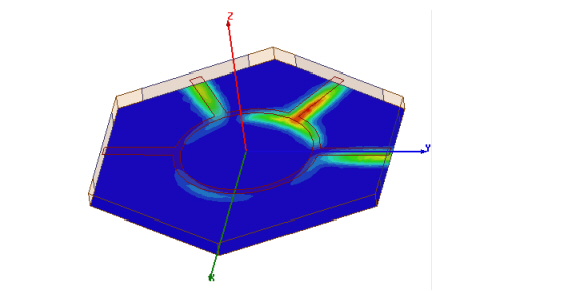
To view the shade plot as shown, change excitations so that ports 2 and 3 are excited by equal amplitude and phase, using HFSS>Fields>Edit Sources.
To view a phase animation of the resulting shade plot, right click on MagE1 and choose Animation from the menu.
-

国内最全面的HFSS培训课程,包含7套视频教程和2本教材,资深专家讲解,视频操作演示,结合最新工程案例,让HFSS学习不再难...【详细介绍】
