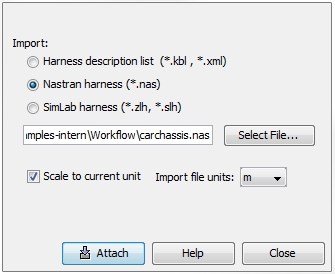
Cable Data Import
Import Cabling  Import Cable Harness
The corresponding dialog box enables the import
of existing cable harness data. Three
different Import types
(all ASCII based) are available.
Harness Description
List ( *.kbl, *.xml): KBL is a data structure in xml format.
It is able to contain all information necessary for a complete harness
including the 3D geometry path, the number of cables, cable types, signal
types, the connectors, ... KBL
is currently used by car manufacturers and created by specific inhouse
software tools. Generally, the KBL
data format is public domain.
Nastran Harness (*.nas):
The Nastran interface provides a universal access to common CAD tools
like CATIA or Pro-E. Such tools offer the capability to export the 3D
geometry of a cable path as a polygon line in Nastran format. When importing
Nastran files, CST CABLE STUDIO automatically scans for such polygon segments
(type: CBAR) and stores them
inside the Nodes
and Segments list.
SimLab Harness (*.zlh,
*.slh): The *.slh format is the internal harness data format of
CST CABLE STUDIO. This harness description is stored in every CST CABLE
STUDIO project under the following relative path: "project
name\Model\CBLS\Harness\harness.slh".
In case of Harness
Description List there is the possibility to add more than one
single file by pressing the Add
button. This function exists because one single *.kbl
file often contains only parts of an entire cable harness that has to
be investigated (e.g. for motor control unit or for floor plan components).
After pressing the Add button
a file browser will appear and the user can select
one or more *.kbl files. After having
added all necessary files the Attach button will be released and enables the import.
A *.kbl-file normally includes the unit size of
its harness data and therefore, the size of the overall harness is unique.
In case of SimLab harness only
one file can be specified. The *.slh format is the internal harness data
format of CST CABLE STUDIO. This harness description is stored in every
CST CABLE STUDIO project under the following relative path: "project name\Model\CBLS\Harness\harness.slh".
In case of Nastran Harness
only one file can be specified. A *.nastran file normally does not include
the unit size of its harness data. In order to get a unique size of the
imported harness, there is the possibility to specify the unit size which
is used during the import (see figure below):